[PROJECT] 7,500 Miles in a Self-Driving Car
One month on the road with a self-driving car
In summer 2025, I had a pretty big goal. I wanted to drive across the entire western half of the country on a solo road trip, within the span of one month.
It took weeks to plan out the complete itinerary, which involved stops in over 23 states, and visiting with twelve different friends all across the country, plus working out of three different company headquarters locations.
But the coolest part of the trip (by FAR) was how I did it with the help of a Comma 3X.
I set it up in the 2-3 weeks before the trip, and got all the kinks worked out just in time. In the end, the Comma handled the vast majority of highway driving, and I only ended up doing that last 30-40% of each drive manually.
I’d love to show you how I did it!
What is a Comma 3X
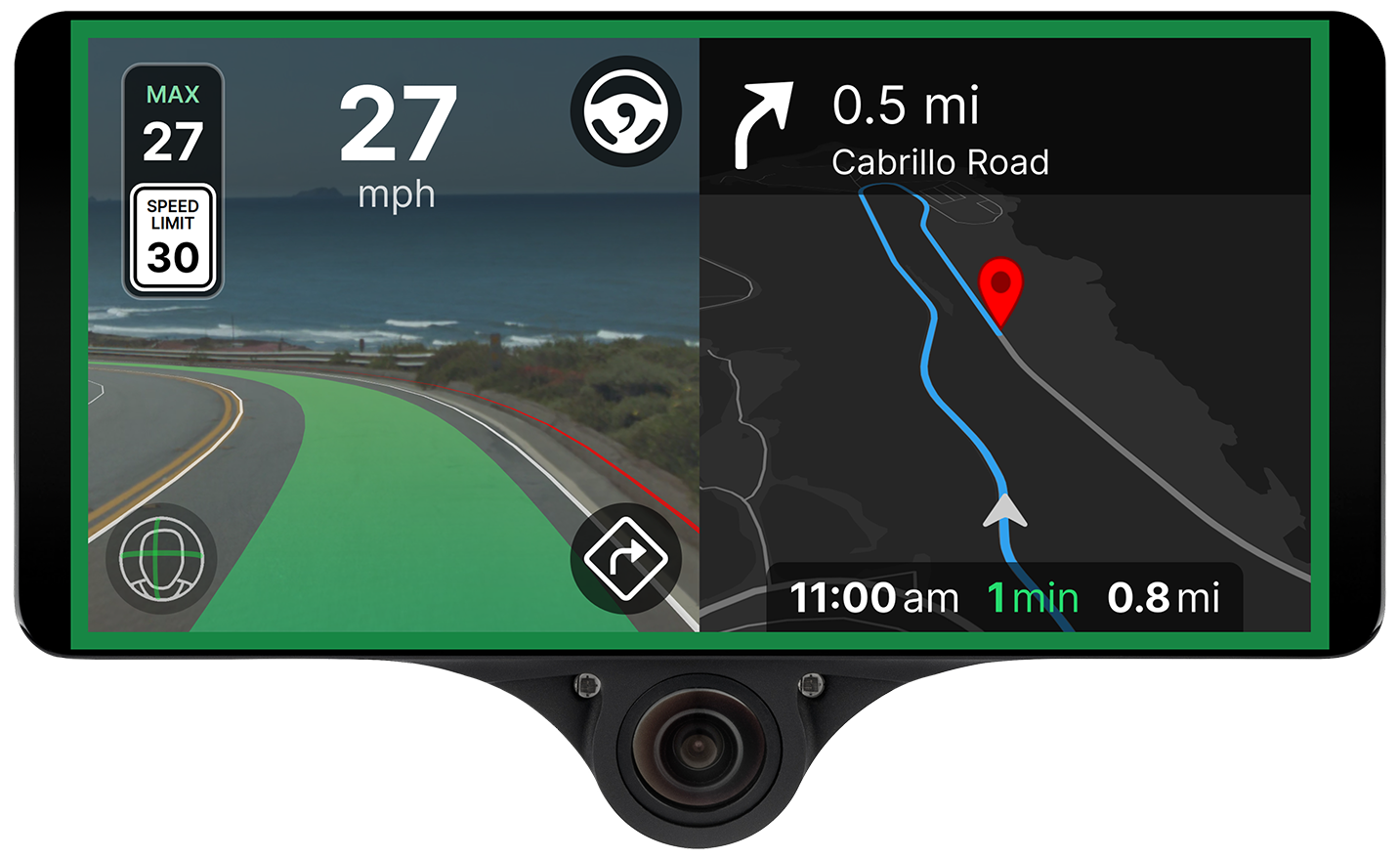
So Comma.ai is the name of the company, and the 3X is a small, windshield-mounted computer. It takes control of the steering in most production cars. It runs their custom software called OpenPilot, which is a fully customizable user interface for the device.
At first, I saw that my Kia wasn’t supported, so I gave up my hopes of autonomous driving as soon as I got this car in 2024. A year later,though, I joined a Discord and found out that several other Kia owners had retrofitted this to their (newer) cars, so I could do it too. I just had to use this obscure fork of the software I found.
Some helpful background: Comma’s software is open source, which means the official version is only stock openpilot. There are plenty of community forks for different cars, different preferences, and edge cases that Comma decided not to support. To that end, a group known as Sunnypilot actually made their own fork of it, adding new features. And within that Sunnypilot Github repo, there’s this fork some Hyundai/Kia/Genesis (HKG) owners made. THAT’S the one that I use. So if you end up googling Comma openpilot and see your car isn’t supported, I highly recommend doing some more research. In my case, my car wasn’t supported, but all I had to do was join the Discord, learn what kind of harness I’d need, buy that one, and figure out who in the community had already forked the code.
Installing it
This is where it gets fun..
You’ll need to look up the Comma setup video specific to your car. I found that all HKG cars have similar installation instructions, so it was pretty easy to get mine put in. 5 minutes of looking through YouTube and you should be on your way.
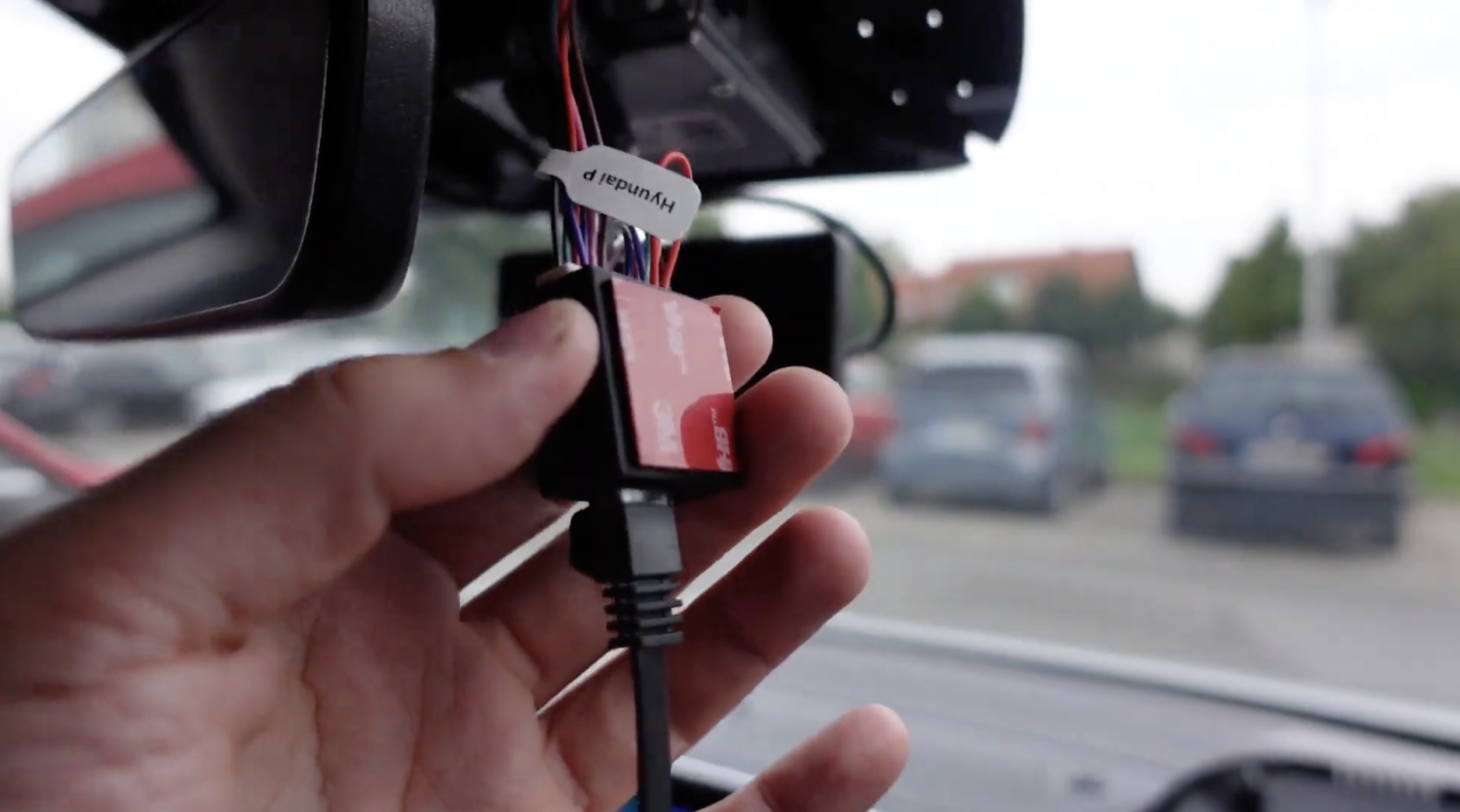
The interesting thing about the Comma 3X is that it sits between your car and the camera. It intercepts the feed coming straight from the camera, decodes it, and uses it for autonomous control. It also has a genius passthrough mechanism where it will pass the camera footage straight through to the car if the Comma loses power. When driving, this would save me in the rare instances in which the Comma was annoying me and I pulled its power plug. Once you do that, the car defaults to its own controls without any issue. It’s a highly resilient setup.
Setting it up
First launch
By far the hardest thing to work on with a Comma is the software. It will install openpilot by default, which will fuck you over if you are like me and don’t have a supported car. Don’t do this! You will spend so much time trying to force a factory reset only to reinstall openpilot by accident.
On setup, you need to choose “Custom software”, and enter in a link. What link exactly? This is where it gets weird.
After a ton of research, I learned you can point the Comma at a website with a release image of the software you want. It’s nearly impossible to figure it out, though. I literally could not find the link for sunnypilot. But then I learned that Comma will actually do it for you, as they host Sunnypilot on their own domain. You just type in “sunnypilot” in the custom software URL box, and that’s it. For me, I’m using a branch of the sunnypilot GitHub repo, so I do “sunnypilot/ccnc-port”.
Getting the specifics right
There are a million variables to configure once your Comma fully boots. The Comma will try to identify your car’s fingerprint. Fingerprinting is essentially the Comma identifying what car you own, and what APIs it’s going to need to interact with to control your steering. By default, it should be able to fingerprint your car. If it can’t, you’re screwed. It will let you choose a car manually from the list, but the fact that it couldn’t figure it out automatically means it can’t communicate with your car properly, so you really can’t choose it manually. This happened to me a lot when I would try different branches of Sunnypilot, and led to me doing endless factory resets. For me, the only branch of Sunnypilot that can fingerprint my car is ccnc-port, so make sure you use the appropriate port for your car. You can search the Sunnypilot Discord for your make and model and see what others did to get it set up.
After fingerprinting, you should go into the settings menu and start configuring things to your liking. Using custom settings, you can have it display the current speed limit, your current speed, and many other cool metrics. I turn most of these on. One thing Comma does that I’ve never seen anywhere else is it will actually show you the speed of the car in front of you. I don’t know why car manufacturers don’t do this to begin with, since all modern ones are seeing this data with their ultrasound sensors. Either way, it’s great to have this on the Comma.
There are also a lot of configuration settings that will affect your driving. It comes with dozens of driving models, each one being about ~70MB a piece and containing a slightly modified version of a driving model based on who trained the data. Comma releases these regularly, as they have their own in-house datacenter that generates them. No model is ever the ‘best’ one, since all cars are different. You really just have to start driving and figure out which works well for you. For me, that meant choosing like ~10 models and just spending the entire day on the road testing them.
You’ll also want to look at additional things, like how you want lane changes and braking to work. The Comma won’t brake by default, and it won’t do lane changes by default, but it can if you want it to. I personally do automated lane change, but no braking, since the Comma is pretty shit at managing my speed.
Driver monitoring
By far the most ‘controversial’ aspect of the Comma is that it enables hands-free driving. To accomplish this without being reckless, Comma developed a driver monitoring system that runs at all time. The Comma 3X has a wide-angle camera which constantly watches the driver and runs a neural network to assess their attention. For example, if the driver uses a phone during driving, Comma will notice that and start beeping.
Since the software is completely open source, you might think you could change these settings. Turns out, you absolutely can. For anyone wondering, it’s two files, helpers.py and monitoring.py. I have done extensive amounts of testing with mine, and have arrived at a happy medium for monitoring: I do WANT the monitoring, since hands-free driving could lead to instances where I become inattentive to what’s on the road, but it shouldn’t be annoying. I wanted the system to notice real inattention without yelling at me every time I glanced at navigation or checked something quickly at a stop. So I ended up changing the code, but only slightly. You may want to do this too.
One thing I like about the attention tracking is that if Comma notices me being drowsy, it will make an extremely loud beep to wake me up. This did happen often when I would drive late at night, and I am very thankful for it. The monitoring you get with the Comma is honestly great peace of mind. You can also be assured that your face isn’t being recorded and uploaded anywhere, because you control the software, end to end. It’s great.
Beyond the basics: Asking for help
If you do try to get set up with this, there can be tons of issues. Driverless car technology is insanely complicated, and was extremely difficult to get set up even for someone like me. The great thing about buying a Comma 3X, though, is that you’re joining a huge community of car drivers just like you. Sunnypilot and Openpilot both have large Discord chats you can join, and a lot of the useful information is scattered across threads, branch names, harness recommendations, and people casually mentioning the one setting that makes everything work.
Taking it out West
The Comma ended up coming with me on the trip, as I was able to get everything set up just in time. I would turn it on during highway driving and usually not much else. It’s not very well trained for steep turns, and will often overshoot them and drive the car slightly to the inside of the lane. Highway driving worked perfectly though, and it did a great job of keeping me centered. The really cool thing is that they’ve trained it in all kinds of driving scenarios, so it can reliably steer during the day, at night, and even during rain.
As I went across the country, I started using it more as a copilot than something which completely replaced my driving. For example, knowing I’ll be going through a stretch of straight, level highway with no one else meant that I’d turn it on and then focus more on the scenery than the drive. Sometimes I’d turn it on while I’m going to change climate settings or otherwise occupied, using it as insurance that I didn’t swerve when I did whatever the task was. I would also use it while I was actively steering, almost to provide insurance that I’d stay on the road. If I ever got too close to the edge of a lane, Comma would gently steer me back to the center (This is in contrast to cars that only steer to block lane departure, as they don’t continue steering to KEEP you in the middle of your lane. Comma does).
In all, it was a lot of fun. I really enjoyed being out West and I think the comma was part of the reason the trip went so well. It takes a lot of the headache out of driving, and makes it more of an adventure.